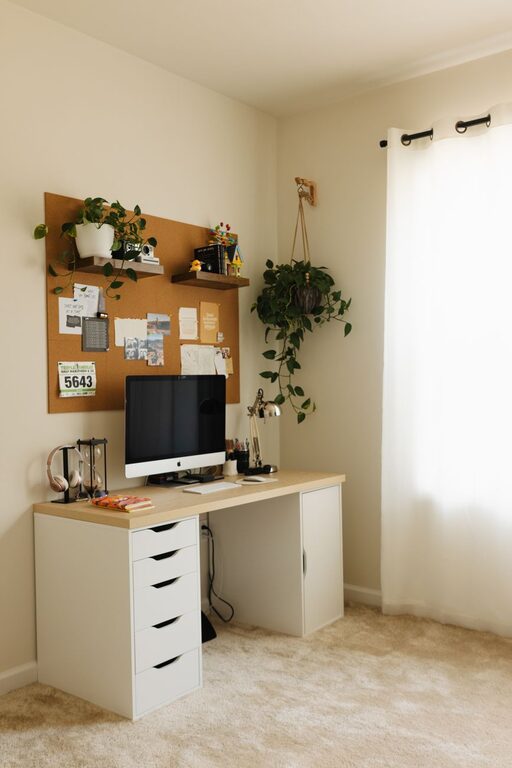

Creating a home office that feels cozy while also helping you stay productive can make a big difference in your work-from-home experience. Whether you’re setting up a new workspace or refreshing an existing one, balancing comfort and efficiency is key. Here are practical tips to help you design a home office that supports your best work and feels inviting.
1. Choose the Right Location
The first step is picking a suitable spot in your home. Ideally, you want a quiet area away from distractions like the TV or heavy foot traffic.
– Natural light: Try to position your desk near a window for natural light, which can improve mood and reduce eye strain.
– Privacy: Consider a room with a door you can close if possible, to separate work from home life.
– Space: Make sure there is enough room for your desk, chair, and any equipment you need without feeling cramped.
2. Invest in Comfortable, Supportive Furniture
Your furniture choices impact both your comfort and productivity throughout the day.
– Ergonomic chair: Choose a chair with good lumbar support and adjustable height to keep your posture healthy.
– Desk: Pick a desk large enough for your computer, notebooks, and other essentials. Standing desks or adjustable desks offer flexibility.
– Storage solutions: Use shelves, filing cabinets, or organizers to keep your workspace clutter-free.
3. Optimize Lighting for Focus
Lighting is a simple way to improve your work atmosphere.
– Task lighting: Add a desk lamp with adjustable brightness for focused work, especially in the evenings.
– Avoid glare: Position your screen to avoid glare from windows or overhead lights.
– Warm vs. cool light: Warm lighting can create a cozy mood, while cooler light helps stay alert. Experiment to find your best balance.
4. Personalize Your Space
Adding personal touches makes your office a place you enjoy spending time in.
– Decor: Include art, photos, or plants that inspire and relax you.
– Colors: Use calming colors like soft blues, greens, or neutrals on walls or accessories to create a peaceful environment.
– Comfort items: A soft rug, cozy blankets, or cushions can make the space feel warmer and inviting.
5. Keep Technology Efficient and Tidy
Technology is essential but can also clutter your space.
– Cable management: Use clips, sleeves, or boxes to organize cords and keep them out of sight.
– Wireless devices: Consider wireless keyboard, mouse, and headphones to reduce clutter.
– Monitor setup: Position your monitor at eye level to reduce neck strain.
6. Establish Organization Systems
A neat workspace helps reduce stress and increase focus.
– Daily tidying: Spend a few minutes at the end of each day putting things back in place.
– Filing system: Use labeled folders or digital tools to keep track of important documents.
– To-do lists: Use planners or apps to organize your tasks and prioritize your work.
7. Manage Noise and Distractions
Reducing noise helps maintain concentration.
– Soundproofing: Add rugs, curtains, or soft furnishings that absorb sound.
– Noise-cancelling headphones: These can block distractions, especially in busy homes.
– Background sounds: Some find white noise or calm music helpful for focus.
8. Incorporate Movement and Break Areas
Staying physically active during the day can improve productivity.
– Stretch breaks: Schedule short breaks to stand and stretch regularly.
– Mini workout gear: Consider small equipment like resistance bands or a yoga mat nearby.
– Relaxation zone: If space allows, include a comfortable chair or nook where you can take short mental breaks.
9. Optimize Air Quality and Temperature
Comfort also depends on your environment’s air and temperature.
– Ventilation: Keep windows open when possible or use an air purifier to maintain fresh air.
– Plants: Certain houseplants improve air quality and add a peaceful vibe.
– Temperature control: Use fans or heaters to keep the temperature comfortable year-round.
10. Set Boundaries Between Work and Home Life
Finally, create clear boundaries to avoid burnout.
– Dedicated workspace: Keep work materials in this area only to help mentally separate work time.
– Work schedule: Set consistent start and end times to your day.
– Signal work mode: Arrange your desk in a way that signals when you are “at work” and when you are off.
—
By combining these tips, you can build a home office that feels cozy, supports your health, and keeps you focused throughout the day. Remember, a thoughtful space tailored to your needs will not only improve your workflow but also your overall happiness when working from home. Take your time setting it up and make adjustments as needed to find what works best for you!
About the Author